TABLE OF CONTENTS
TL;DR
- ManagementStudio v16 is built on .NET 10
- Microsoft .NET 10 supports SQL Server 2019 and upwards
- Customers running SQL Server 2016 should plan to upgrade before the release of ManagementStudio v16
- All customers should check their database compatibility level, regardless of SQL Server version
- ManagementStudio v16 will not work on SQL Server 2016
Preparing for .NET 10
Starting with ManagementStudio v16, we've aligned our codebase with Microsoft .NET 10 to maintain full compatibility, performance, and security with Microsoft's .NET platform. With this release of .NET, Microsoft has increased the minimum supported version of their database engine to SQL Server 2019.
We are advising our customers to plan for this change ahead of the release of ManagementStudio v16 in Q1 2026.
Upgrade to SQL Server 2019 or higher
Customers running SQL Server 2016 should plan to upgrade in advance of installing ManagementStudio v16. Although upgrading SQL Server is general considered straight forward with careful planning, please allow sufficient time to validate the SQL Server upgrade before moving to ManagementStudio v16.
As with all upgrades, please ensure that the ManagementStudio database is fully backed up before performing the upgrade.
For further information on upgrading your instance of SQL Server, please consult your database team or refer to the Microsoft upgrade documentation.
Database Compatibility Level
Regardless of the SQL Server version currently hosting your ManagementStudio database, all customers are advised to confirm that the database compatibility level is set to 150 or higher to ensure compatibility with Microsoft .NET 10.
Check the Database Compatibility Level
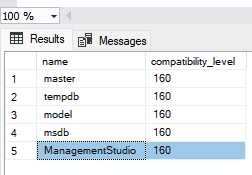
To verify the compatibility level of your ManagementStudio database, run the following SQL against the server:
SELECT name, compatibility_level FROM sys.databases
The output will display the compatibility level of all databases. The values shown should be 150 or higher to meet the minimum requirements of .NET 10.
Change the Database Compatibility Level
To update the compatibility level to match your SQL Server version, use the following SQL command:
ALTER DATABASE [ManagementStudio]
SET COMPATIBILITY_LEVEL = 160;
The compatibility level values for supported versions of SQL Server are:
- SQL Server 2019: 150
- SQL Server 2022: 160
- SQL Server 2025: 170
Please refer to Microsoft's Best Practices for Upgrading Database Compatibility Level for more information.
ManagementStudio v15 Support
Feature development of ManagementStudio v15 ended with the release of v15.13.xx in December 2025 and will continue to receive major bug fixes and security updates until June 2026.
New feature requests will be implemented in ManagementStudio v16.
Further Support
If you require further support, please visit ManagementStudio's Service Desk to search the knowledge base or create a new support ticket.
Was this article helpful?
That’s Great!
Thank you for your feedback
Sorry! We couldn't be helpful
Thank you for your feedback
Feedback sent
We appreciate your effort and will try to fix the article