TABLE OF CONTENTS
- Inferring Application Device Usage Based on User Migrations
- Datamining Output Examples
- Dynamic Columns Tier
- Expression Tools
- Joining Fields
- Comparing Fields
- Comparing Values in Two Columns
- Formatting Dates
- Adding and Subtracting Dates
- IIF Statement (True / False)
- Html Buttons
- Date Range
- Separate a word in a Column
- Applying Specific Formats to Numbers & Dates in a Report
- Adding Buttons to a Web Datamining Report
- Expression Data Types
- Colour Expression Columns
- Further Support
Inferring Application Device Usage Based on User Migrations
Use Case
There are often occasions where Application records are linked to User Migrations in ManagementStudio but there is no corresponding Device information. For example, when AD Groups are used to deploy applications to users, as is the case with App-V or SaaS applications.
In these scenarios, it's useful to report on which devices could be used to access the application, but without the traditional user-device-application links created by the Connectors, an alternative approach is required.
Prerequisites
- The Application record in ManagementStudio should contain the name of the AD group used to deploy the application. This can be added using the Connectors tab and populating the App AD Required Groups field.
- The AD Connector should also perform a full sync once the AD groups are added to the application records.

Creating the Report
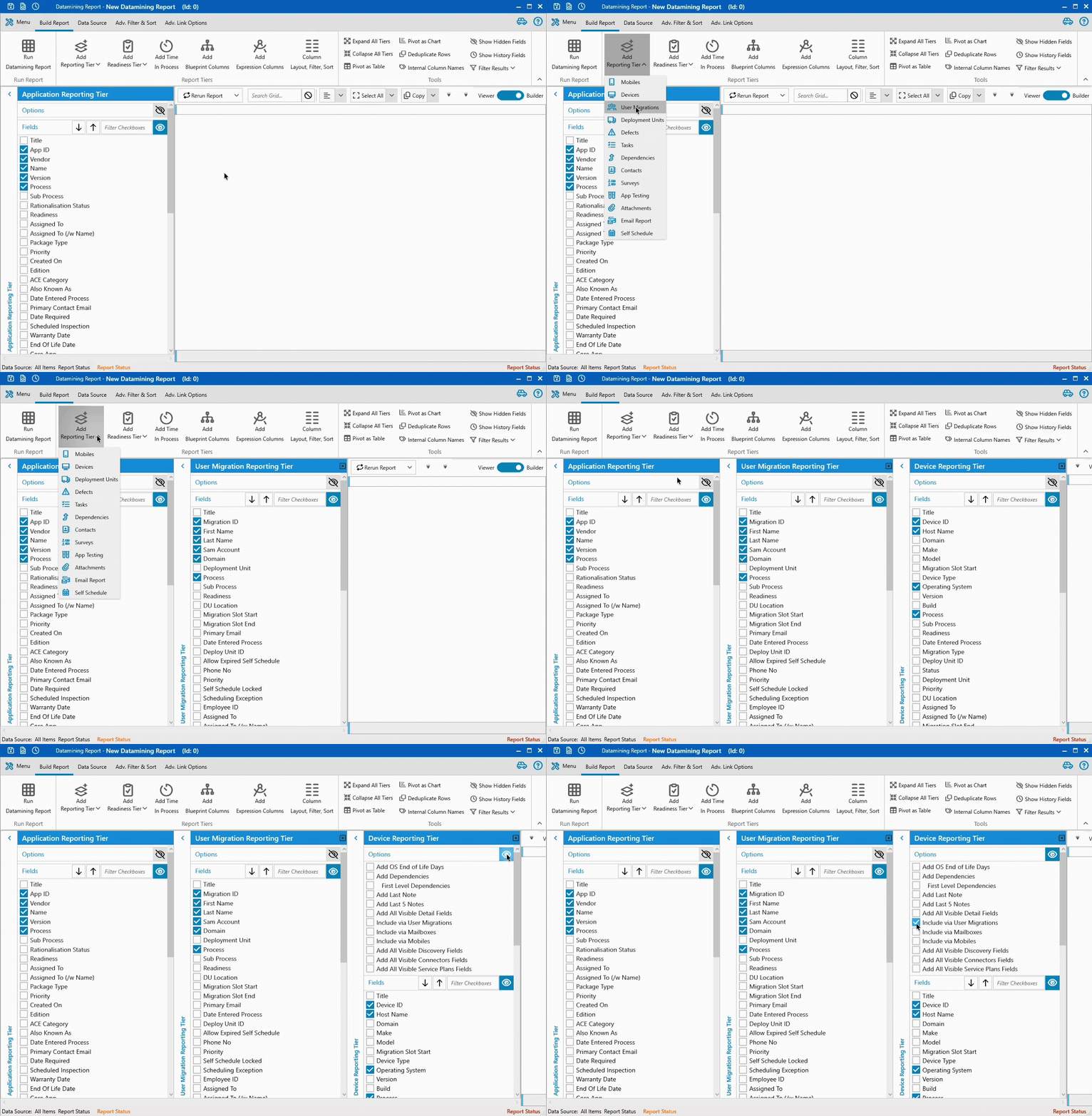
The Datamining Report builder will open with the Application Reporting Tier loaded already. Two additional tiers are required for this report:
- Click Add Reporting Tier in the ribbon and select User Migrations from the dropdown.
- Click Add Reporting Tier again and select Devices.
- In the Device Report Tier, open the Options panel and tick Include via User Migrations.
- Run the Datamining Report to view the report.
Datamining Output Examples
Example 1: Show Application Users
Joe Blog (PM) needs a list of Applications and their Users.
Steps:
- In the User Migrations module, select a group of Users.
- Click
Datamining Report. - In Report Builder, select the User fields to include. (e.g. First name, Last name, email address)
- To add the User's Apps, click
Add Reporting Tier, selectApplications, - Run the report
- Optionally - Save the report via the spanner icon:
Save ReportorSave As.
Example 2: Application Readiness for a Deployment Unit
Joe Blog needs Application readiness details for Users in the Plymouth Office.
Steps:
- Go to the
Deployment Unitsmodule. - Click
Datamining Report. - Add Reporting Tier: select
User Migrations. - Click
Data Source. ChooseSelect Deployment unit, and selectSW-Plymouth. - Run the report to show Users in SW-Plymouth.
- Add Readiness Tier: select
Applications. - Run the report again to display Application readiness.
Dynamic Columns Tier
Dynamic Columns are advanced columns that can be added to the grid. It enables report creators to add custom-constructed formulas by combining, manipulating or calculating data from other columns on the report.
Expression Tools
| == | Determines if the column's text is equal to the specified value. |
| <> | Determines if the column's text is not equal to the specified value. |
| >= or <= | Greater than or equal to, and less than or equal to. |
| && | 'And' e.g. RAM >= 2 && RAM <= 8 |
| || | 'Or' e.g. RAM >= 2 || CPU >= 2.4 |
| == DBNull.Value | Used to check if a value is blank. e.g. Device_RAM == DBNull.Value |
| .StartsWith() | Determines whether the beginning of this column's text matches the specified text. |
| .EndsWith() | Determines whether the end of this column's text matches the specified text. |
| .Contains() | Returns a value indicating whether the column's text occurs within this text. |
| IndexOf | Returns the first index of a string in a column. e.g. IndexOf (Defects_Process, Testing) NB Can't be nested in a larger expression |
| LastIndexOf | Returns the last index of a string in a column. e.g. LastIndexOf(Defects_Process, Testing) NB Can't be nested in a larger expression |
| Replace | Do a find replace on part of a value in a column. e.g. Replace(Defects_Process, Testing, Tested) NB Can't be nested in a larger expression |
| Format | Apply a format to a Date or Number. E.g. Format(Defects_CreatedOn, yyyy-MM-dd) NB Can't be nested in a larger expression |
| ToUpper | Convert the value of another column on the report to Upper Case. E.g. ToUpper(UserMigrations_Domain) NB Can't be nested in a larger expression |
| ToLower | Convert the value of another column on the report to Lower Case E.g. ToLower(UserMigrations_Domain) NB Can't be nested in a larger expression |
Joining Fields
For example, to create a field to include the User's proper name, the expression would combine FirstName LastName whilst adding a space between the fields. For further information about Expression columns, please refer to this Microsoft article.
"First Name" + ' ' + "Last_Name" = "FirstName LastName"
Dave {Space} Smith Dave Smith
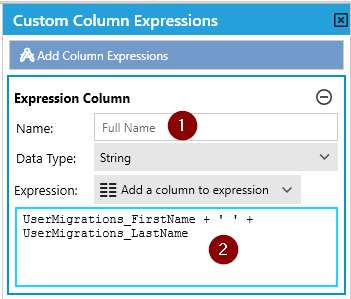
The screenshot above shows the necessary expression statement to calculate the column Full Name (1) and is an example of an action performed on text i.e. a String.
The Data Type refers to the type of data that will be in the calculated column, NOT the data type you are performing the test on.
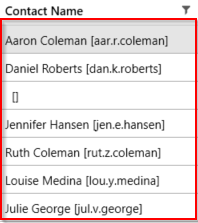
Expression:
Contacts_FirstName + ' ' +
Contacts_LastName + ' [' +
Contacts_SamAccount + '] '
Result:
Comparing Fields
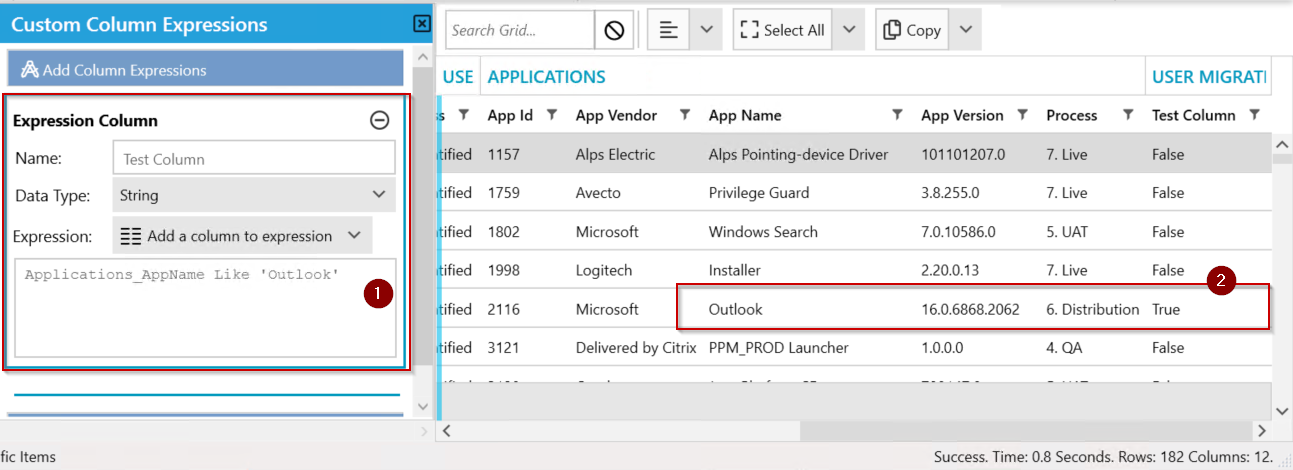
Comparing a string with some known text will return a true-false, not the string itself. The following example compares a string with a known text (Outlook) from the App Name column.
- Click Add Dynamic Columns Tier.
- Enter the name of the column.
- Select String as the Data type.
- Click the Add a column to the expression dropdown and select the column to perform the comparison. In the screenshot below, AppName [Applications_AppName] is selected.
- Enter Applications_AppName Like 'Outlook' (1).
- Click Run Datamining Report.
- The results displayed will show an additional new column with the values 'True' or 'False' (2).
Comparing Values in Two Columns
Comparing the values in two fields and returning a true or a false.
IIF((CustomField_13694 like '*' + CustomField_12085 + '*'), 'Yes' , 'No')
Formatting Dates
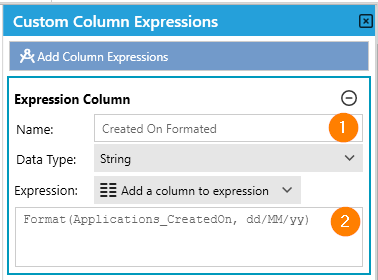 | 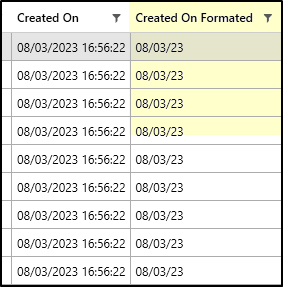 |
1. The Name of the Column to display in the report.
2. Format the date in 'Applications_CreatedOn' as dd/MM/yy e.g. 10/03/24
Note, formatting dates is a standalone expression and can't be used in conjunction with multiple expressions in the same column.
Adding and Subtracting Dates
Two functions exist for working with dates: DateAdd and DateSub.
Both functions take two parameters:
The first must be a date column on the DMR.
The second can be either a date or a number. It may come from another column on the DMR or be a static value.
Rules
Subtracting two dates → returns the number of days between them (a numeric result).
Adding or subtracting a number to/from a date → returns a new date.
Adding two dates together → not allowed, as the result would have no meaning.
Examples
1. Subtracting Today from a date
Result: Number of days between MigrationDate1 and Today.
Example: 17.5
2. Subtracting a number from a date
Result: MigrationDate1 minus 10 days (returns a Date).
Example: 10/1/2025
3. Subtracting one date from another
Result: Number of days between MigrationDate1 and MigrationDate2.
4. Adding a number to a date
Result: MigrationDate1 plus 10 days (returns a Date).
Example: 10/1/2025
5. Adding a custom field value to a date
Result: Adds the numeric value in CustomField_XXX to MigrationDate1 (returns a Date).
Example: 10/1/2025
IIF Statement (True / False)
In this example, we'll be using the IIF() function. Return Yes if the condition is TRUE, or NO if the condition is FALSE
We will be returning Yes or No if the Last name of the User is Gordon.
IIF (UserMigrations_LastName like 'Gordon*', 'Yes' , 'No')
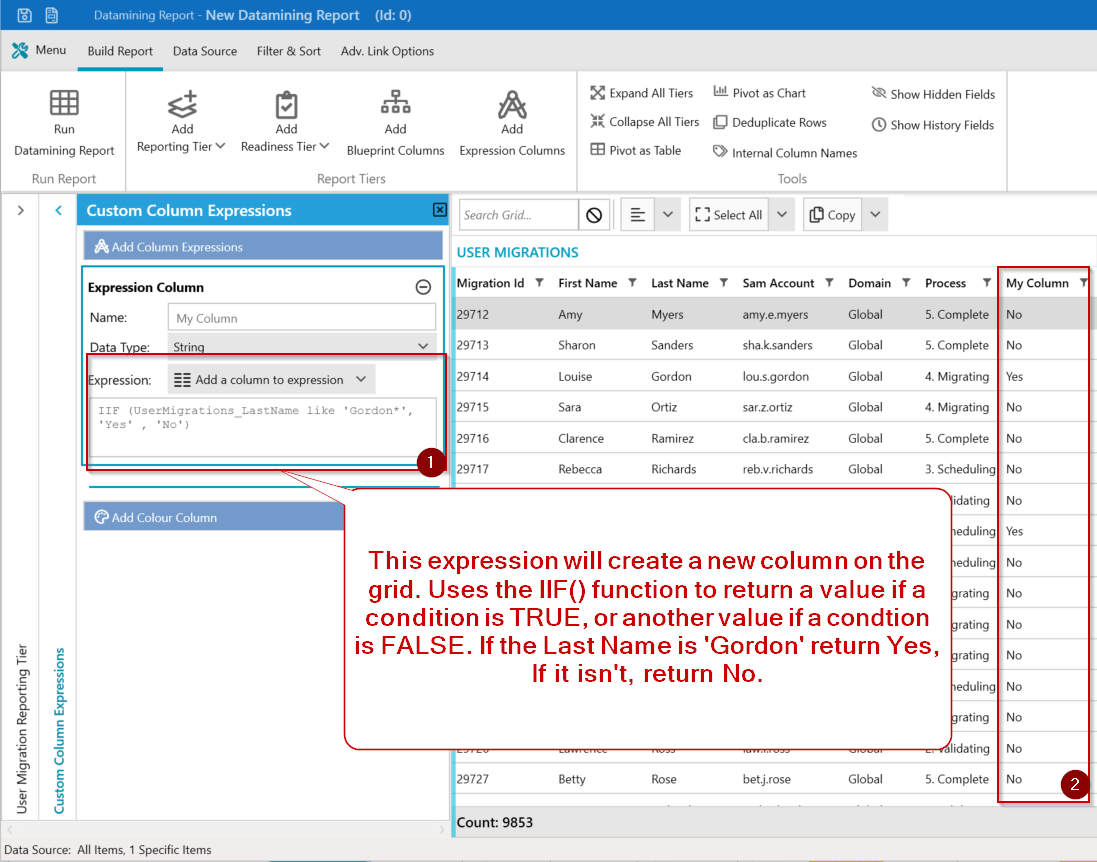
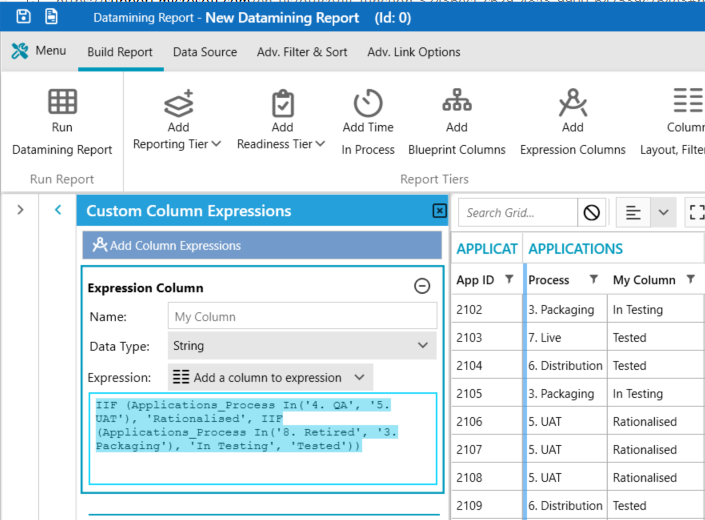
The Nested IIF Statement can be used to specify multiple conditions.
IIF (Applications_Process In('4. QA', '5. UAT'), 'Rationalised', IIF(Applications_Process In('8. Retired', '3. Packaging'), 'In Testing', 'Tested'))Results: If Application process is '4. QA' or '5. UAT', return 'Rationalised', if the Application process is '8. Retired', or '3. Packaging' return 'In Testing'. Otherwise, return 'Tested'.
Another IIF nesting example:
IIF (Blueprint_BlueprintColumn like '*americas*', 'AMER', IIF(Blueprint_BlueprintColumn like '*europe*', 'EMEA', 'APAC'))Here the Blueprint column contains three regions. The nested IIF statement is shown in red. The Expression Column will simply display AMER, EMEA or APAC.
Idea - Think about using expression columns look at some chrs within a string. i.e. return 1st 5 chrs of a hostname - SUBSTRING(Devices_HostName,1,5)Example to check if survey email has been sent, and set column text to either "Sent" or "Not Sent":
IIF(SelfSchedule_RequestEmailSent Is Not Null, 'Sent', 'Not Sent')
Example to check if survey email has been sent in the last seven days, and set column text to either "Sent" or "Not Sent":
IIF(SelfSchedule_RequestEmailSent >= '[Today - 7]', 'Sent', 'Not Sent')
Html Buttons
For a DMR that will be ultimately displayed on a web page, it is possible to craft HTML that will be rendered as buttons in the browser. Using other fields from the report parameters can be subbed into the url called by the button.
Using Expression to create a Url column
Further using the Url Column from above to inject into an Html Button
Date Range
Produce a report to show all the users from the Bedford Deployment Unit that are to be migrated in two days time.
- Switch the User Migration module.
- Click Datamining Report button from the ribbon.
- Click Data Source tab.
- Select Deployment Units and click Add Deployment Units, add the Bedford deployment unit.
- Within the User Migrating Reporting Tier, ensure the Migration Slot Start is selected in addition to the default fields.
- Click Run Datamining Report to add the new columns to the grid.
- Click the Build Report tab and click Add Expression Columns.
- Enter a name for the column in the Name field, such as Is In Scope.
- Select String as the data type.
- Click Add a column expression and choose the Migration Slot Start column.
- Ensure the following expression is entered.
UserMigrations_DeployUnitSlotStart > '[Today + 2]' And
UserMigrations_DeployUnitSlotStart < '[Today + 3]'
- The expression will perform a comparison of the Start date in that column and return TRUE if the start date falls in two days time.
- Click Run Datamining Report to rebuild the report.
- The resulting report will create a new column with the results of the comparison.
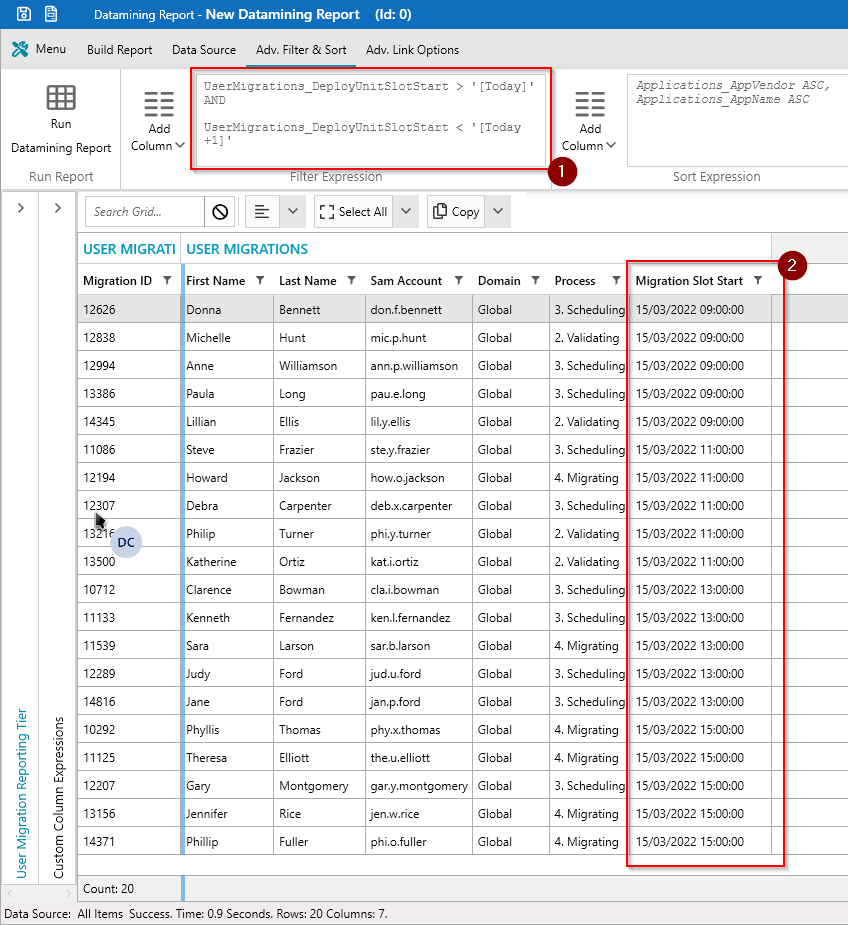
The following expression will return all Users that have their migration slot scheduled for today.
UserMigrations_DeployUnitSlotStart > '[Today]' AND
UserMigrations_DeployUnitSlotStart < '[Today +1]'
Separate a word in a Column
In this example, we'll be using the SubString function to separate words in a column.
Syntax - Substring(expression, start, Length) where
- Expression is the source string for the substring
- Start - Integer that specifies where the substring starts
- Length - Integer that specifies the length of the string
SUBSTRING(Blueprint_BlueprintColumn, 19, 50)
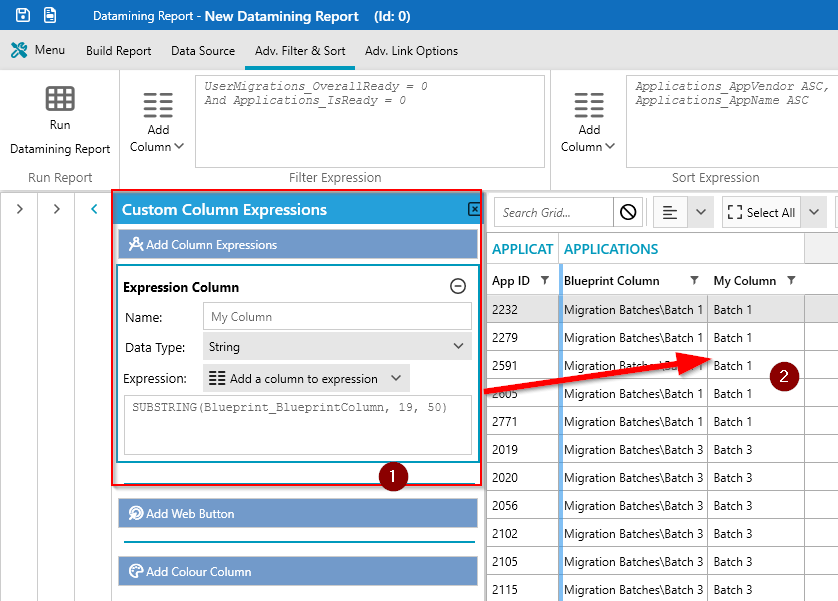
Note:- It is possible to search for a specific character in a string and then use that result in the substring command.
- IndexOf Finds the 1st instance of the specified chr in a string and returns an integer.
- LastIndexOf Finds the 1st instance of the specified chr in a string and returns an integer.
So IndexOf(Blueprint_BlueprintColumn, \) will find the Backslash
LastIndexOf(Blueprint_BlueprintColumn, \) will return the last position of the backslash
Applying Specific Formats to Numbers & Dates in a Report
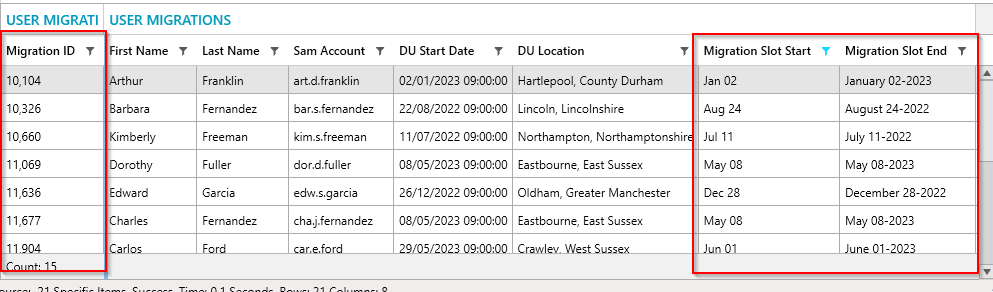
In this example, we will run a User Migrations report to include the User’s Migration Id, their deployment unit start date, their migration slot Start date & Migration slot end date.
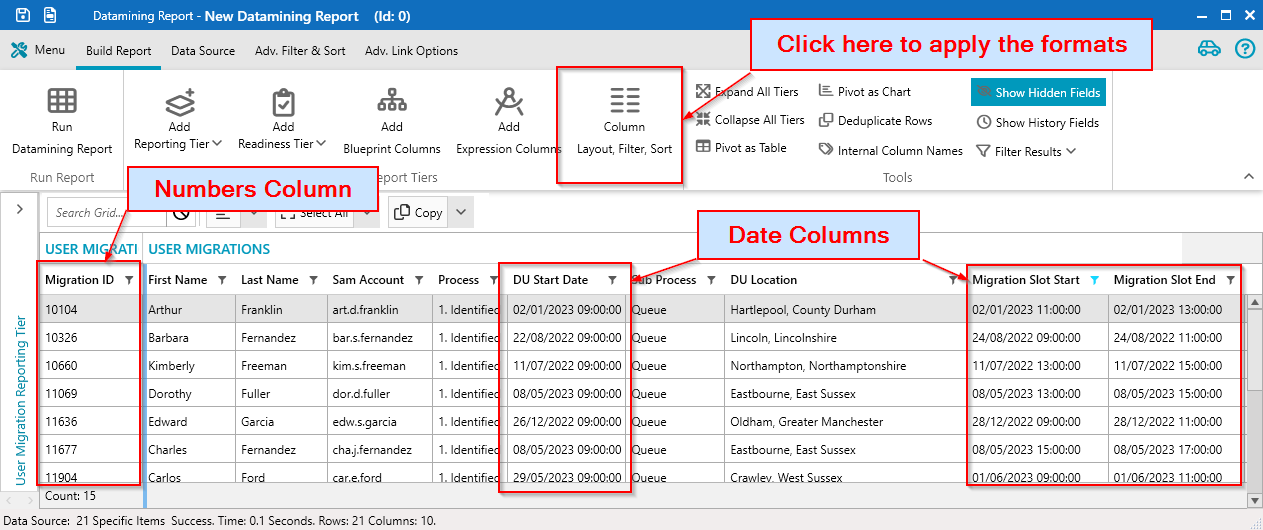
In the screenshot, we have the DU start date, Migration slot start/End as dates & the migration Id column as Numbers.
Click on the Column Layout, Filter, Sort button to apply the specific format.
Within the Data Format column enter the following (1):
- Migration ID row - N0
- Migration Slot Start - MMM dd
- Migration Slot End - MMMM dd-yyyy
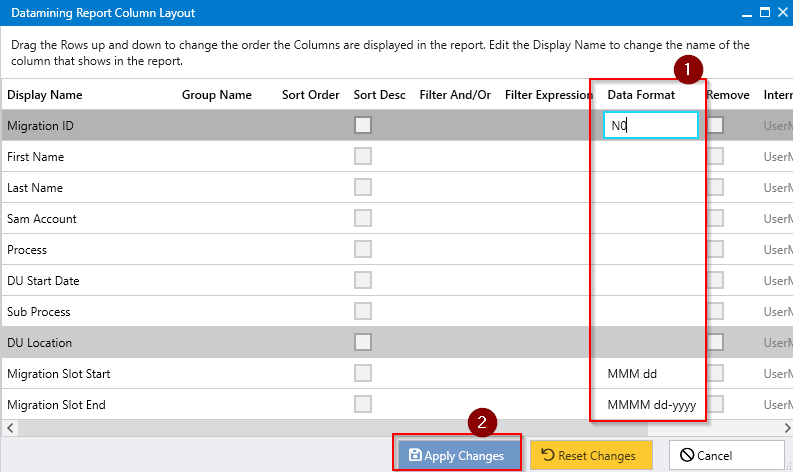
Click Apply Changes (2).
The screenshot below displays the corresponding output within the report.
Please refer to this article for more ways to format a numbers column https://docs.textcontrol.com/textcontrol/wpf/article.techarticle.numberformat.htm
Please refer to this article for more ways to format a date column: https://docs.devexpress.com/WPF/10408/common-concepts/formatting-values/format-specifiers
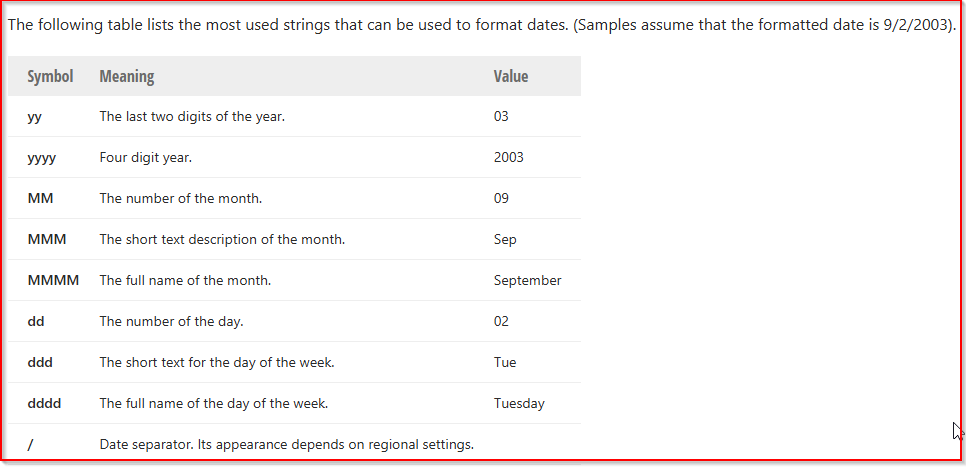
| Column | Format | Output |
| Date | MMMM dd-yyyy (dddd) | August 28, 2022 (Friday) |
| Date | MMMM dd | January 02 |
| Date | MMM dd | Jan 02 |
| Date | MMMM dd-yyyy | August 24-2022 |
| Date | MM/dd/yyyy | 05/12/2025 |
| Date | dd/MM/yyyy | 08/04/2025 |
| Numbers | "EUR"#.00 | EUR1012.00 |
| Numbers | #% | 45% |
| Numbers | N0 | 10,985 |
Adding Buttons to a Web Datamining Report
Please refer to this article on How to.
Expression Data Types
| Data Type | Use |
| String | Text Operations i.e. "AAAAA + BBBBBB" or "AAAA Like AA*" |
| DateTime | Only used to display a calculated date based on today + or - X. |
| Boolean | False \ True represented as a 0 or a 1 |
| Int64 | Whole number integers only, will not return any decimal places and will round. i,e, 99.3% = 99% |
| Decimal | Will return decimal places i.e. 99.33333% = 99.33333% |
Notes:
- The source data for the calculated field must be selected in the report settings.
- Comparisons will return Boolean checkboxes or String False\True.
- Aggregated data may not be calculated i.e. "Count" "Average" "Sum".
Dates benefit from having a keyword that can be used for comparison [Today +2] is 2 days from today.
It is also possible to do date comparisons that include the time by using the keyword TimeStamp
i.e. UserMigrations_DeployUnitSlotStart < '[TimeStamp]' will return True if a slot time has passed.
Colour Expression Columns
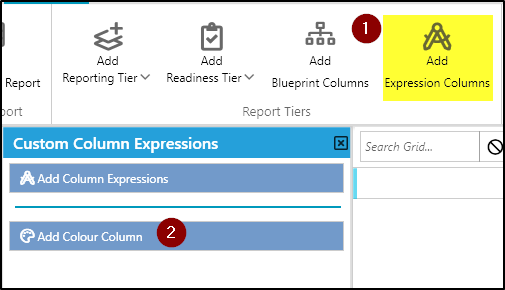
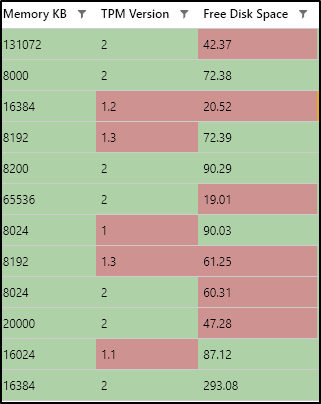
By colouring the items in a report, a user can add an extra dimension to the data displayed. For instance, the use of colours to identify Users in a specific Blueprint, or distinguish different deployment units. In the Datamining report, the Add Colour Column allows the report creator to customize the colouring of their report.
Colour Express Rules
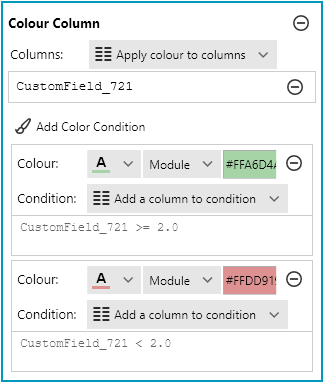
Rules can be very useful when setting up colour schemes for visualisation purposes. Here are the rules available:
| == | Determines if the column's text is equal to the specified value. |
| <> | Determines if the column's text is not equal to the specified value. |
| >= or <= | Greater than or equal to, and less than or equal to. |
Example
A report creator may want to visually improve a report by highlighting fields that don't meet a particular value.
| Steps | |
|  |
|  |
|  |
More Colour Expression Examples:
- Expression_FullName == 'Henry Barnes'
- Expression_FullName <> 'Joe Cruz'
Further Support
If you require further support, please visit ManagementStudio's Service Desk to search the knowledge base or create a new support ticket
Was this article helpful?
That’s Great!
Thank you for your feedback
Sorry! We couldn't be helpful
Thank you for your feedback
Feedback sent
We appreciate your effort and will try to fix the article