TABLE OF CONTENTS
- Move a User Migration to a new process/sub-process
- Set a Flag in an OnSubmit Script
- Send a User Migration an email
- Redirect to a URL
Move a User Migration to a new process/sub-process
This command can be used when a Datamining Report has a web button calling a script:
Move-MSUserMigrationProcesses -MigrationIds @($ScriptArgs.Items) -ProcessName "4. Migrating" -SubProcessName "Migration Commenced" | Out-Null
Set a Flag in an OnSubmit Script
$user = Get-MSUserMigrations -MigrationIds $ScriptArgs.Items[0]
$user.ProjectFlag1 = 'True'
Update-MSUserMigrations -Updates $User
Call an ESM in an OnSubmit Script
Invoke-MSESMPlan -Module UserMigrations -Ids $ScriptArgs.Items -PlanName 'DD - Devices Not Reviewed' -ResetPriorToRun -WaitForComplete
Send a User Migration an email
This command can be used to send an email immediately:
Send-MSEmails -Module UserMigrations -ToIds @($ScriptArgs.Items) -EmailTemplateId X -ScheduleSendAt (Get-Date) -SpreadOverHours 0
To send the email in 24 hours time:
$sendtime = $(get-date).AddHours(24)
Send-MSEmails -Module UserMigrations -ToIds @($ScriptArgs.Items) -EmailTemplateId X -SpreadOverHours 0 -ScheduleSendAt $sendtime
Redirect to a URL
Useful in a Portal Form/Survey to add a button to redirect to a specific page.
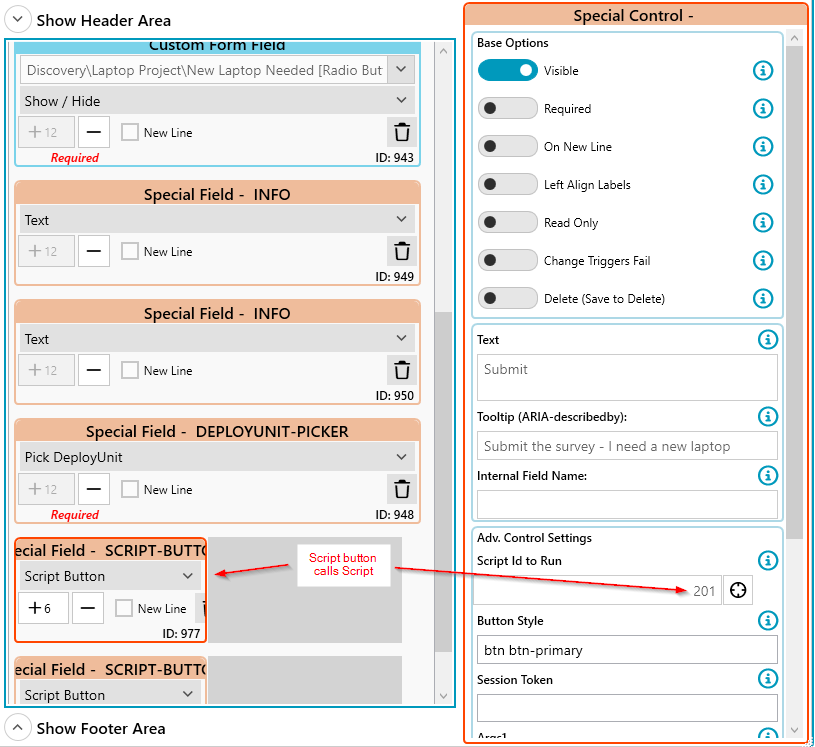
Script:
New-MSApiResult -Header "" -Content "" -WebAlertStyle "Success" -RedirectUrl "https://public.managementstudio.cloud/11/p/schedule"
Was this article helpful?
That’s Great!
Thank you for your feedback
Sorry! We couldn't be helpful
Thank you for your feedback
Feedback sent
We appreciate your effort and will try to fix the article