TABLE OF CONTENTS
- Setting UTC for Deployment Units
- Overview
- Configuring UTC Fields for Deployment Units
- Setting the UTC Offset for a Deployment Unit
- Further Support
Setting UTC for Deployment Units
Overview
Coordinated Universal Time (UTC) is the 24-hour time standard used as the basis for civil time. All time zones are defined by their offset from UTC (e.g., UTC+1:00, UTC-5:00). In ManagementStudio, you can assign a UTC offset to each Deployment Unit to ensure alignment with the correct local time zone.
Configuring UTC Fields for Deployment Units
Follow these steps to make the UTC fields available and visible for Deployment Units:
- Navigate to
Administration → Deployment Units → Details Config. - In the search box, enter
UTC. - Set both relevant fields to
Visible. - Select Save changes.
- Do not restart the client at this stage.
To display these fields on the Deployment Units grid:
- Go to
Administration → Deployment Units → Grid Config. - Search for
UTC. - Set both fields to
Visible. - Select Save changes.
- Now restart the client to apply the grid changes.
Setting the UTC Offset for a Deployment Unit
Once the fields are enabled and visible, set the UTC offset as follows:
- Open the Deployment Units module.
- In the grid, select the Deployment Unit to configure.
- Right-click the selected Deployment Unit and choose Update Fields.
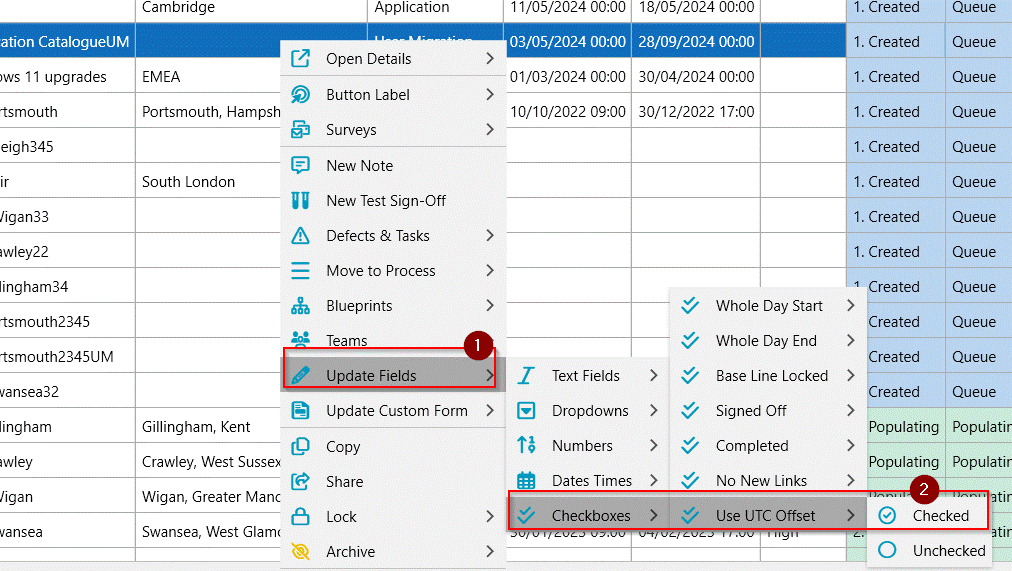
- Under the
Checkboxessection, locateUse UTC Offsetand set it to checked. - Right-click again and choose Update Fields.
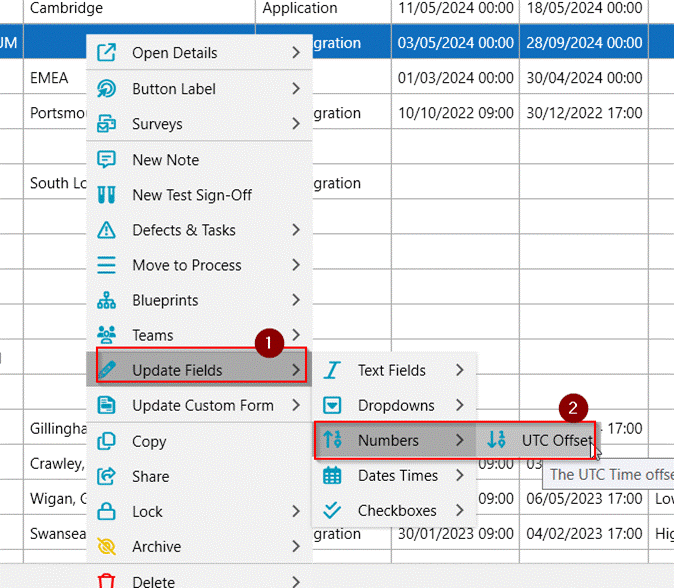
- Under the
Numberssection, set the required value in theUTC Offsetfield.
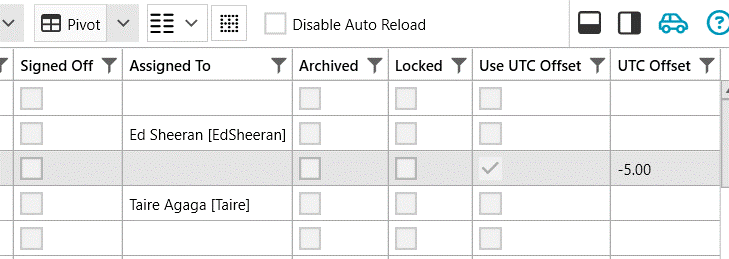
Top Tip - Use this to get the correct UTC value - Time Converter and World Clock - Conversion at a Glance - Pick best time to schedule conference calls, webinars, online meetings and phone calls.
Further Support
For additional assistance, visit the ManagementStudio Service Desk to search the knowledge base or raise a support ticket.
Was this article helpful?
That’s Great!
Thank you for your feedback
Sorry! We couldn't be helpful
Thank you for your feedback
Feedback sent
We appreciate your effort and will try to fix the article