TABLE OF CONTENTS
- REST API Importer: Unique Features
- Overview
- Cross-Project Connections to ManagementStudio
- Common Settings
- Examples
- Further Support
REST API Importer: Unique Features
This article describes features specific to the REST API Importer in ManagementStudio. For information about features common to all importers, refer to the appropriate documentation.
Overview
The REST API Importer allows ManagementStudio to connect to third-party data sources that provide a standard REST API, but do not have an official ManagementStudio connector.
Cross-Project Connections to ManagementStudio
The REST API Importer can be used to connect to the same ManagementStudio instance or to external instances. When cross-project sharing is enabled, this functionality supports copying data between a Primary Project and its Sub-Projects for data that is not shared by default.
When configuring the REST API Importer to connect to ManagementStudio, consult the Endpoint Reports (for PowerBI) article for guidance on constructing REST queries.
Tip: When connecting to the same instance but targeting a different project or module, use the value
[importer-auth-token]for theAuth-Tokenheader.
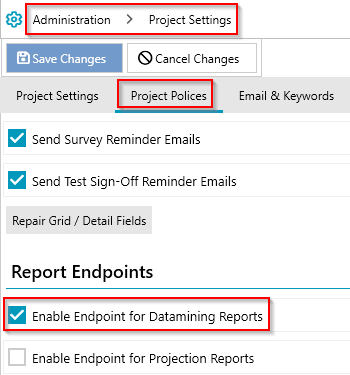
Enable Endpoint for Datamining Reports
To access Datamining Reports via an endpoint, you must enable this setting in the source project.
Common Settings
Rest Api Endpoint Url
Format:https://<ServerAddress>/<ProjectId>/p/report/Datamining/0/<PrefixedName>/json<ServerAddress>: Your ManagementStudio server address<ProjectId>: ID of the Primary Project<PrefixedName>: The prefixed name of the Datamining Report
Import Multiple Matched Rows
- Enable this option to allow importing multiple rows after the first match is found.
- Required for importing lists such as Blueprints and Dependencies.
Examples
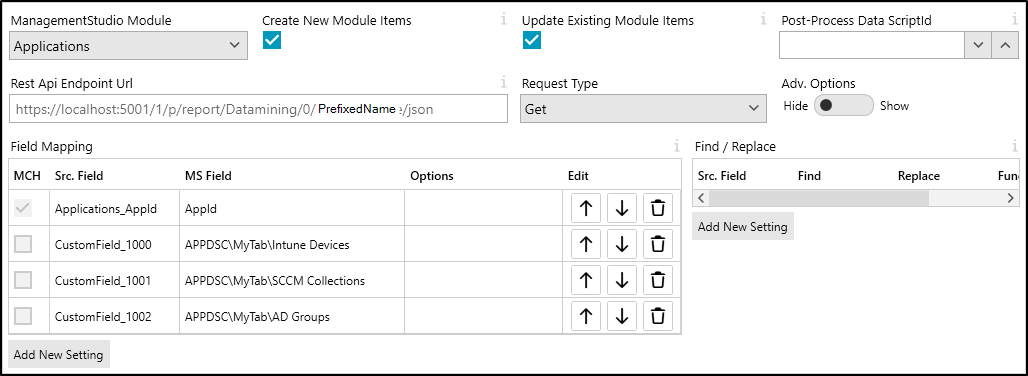
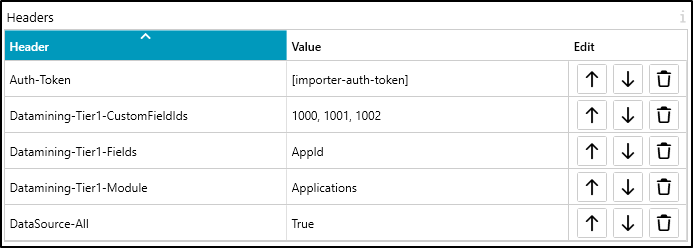
Example: Sync Custom Fields from Primary Project to Sub-Project
Headers
| Header | Value | Note |
|---|---|---|
Auth-Token | [importer-auth-token] | Auto-generated token to connect to ManagementStudio |
Datamining-Tier1-Module | Applications | Retrieves the list of applications |
Datamining-Tier1-Fields | AppId | Adds the AppId field |
Datamining-Tier1-CustomFieldIds | 1000, 1001, 1002 | Comma-separated list of custom field IDs |
DataSource-All | True | Includes all applications |
Field Mapping
| MCH | Src. Field | MS Field | Notes |
|---|---|---|---|
| Yes | AppId | AppId | Uses the AppId from the Primary Project to match in the Sub-Project |
| CustomField_1000 | APPDSC\MyTab\Intune Devices | Copies data from the Primary Project | |
| CustomField_1001 | APPDSC\MyTab\SCCM Collections | Copies data from the Primary Project | |
| CustomField_1002 | APPDSC\MyTab\AD Groups |
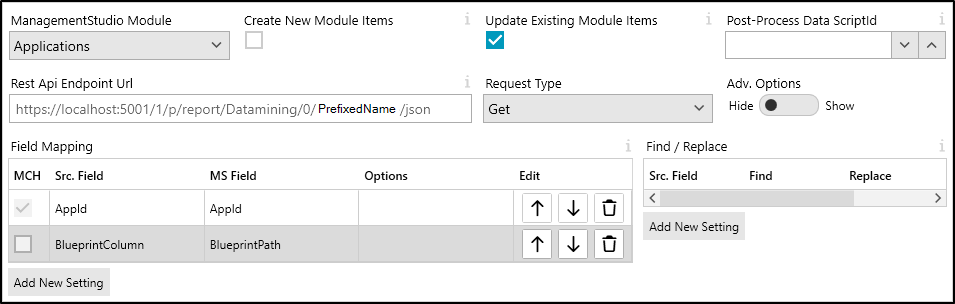
Example: Sync App Blueprints from Primary Project to Sub-Project
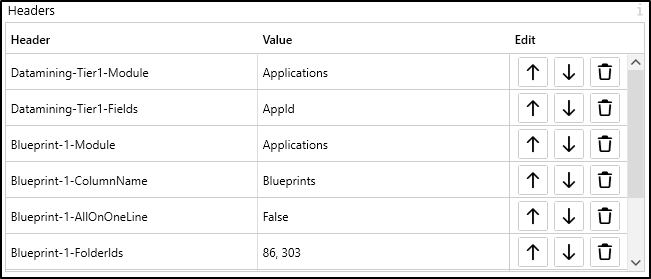
Headers
| Header | Value | Notes |
|---|---|---|
Auth-Token | [importer-auth-token] | Auto-generated token to connect to ManagementStudio |
Datamining-Tier1-Module | Applications | Retrieves the list of applications |
Datamining-Tier1-Fields | AppId | Adds the AppId field |
Blueprint-1-Module | Applications | Retrieves application blueprints |
Blueprint-1-ColumnName | Blueprints | Name of the column containing blueprints |
Blueprint-1-AllOnOneLine | False | Splits multiple blueprints across rows |
Blueprint-1-FolderIds | 86, 303 | Folder IDs to include (e.g. Departments, Location) |
DataSource-All | True | Includes all applications |
DataSource-FilterExpression | Blueprint_Blueprints <> '' | Filters to only applications with a blueprint |
Field Mapping
| MCH | Src. Field | MS Field | Notes |
|---|---|---|---|
| Yes | AppId | AppId | Uses AppId from the Primary Project to find matches in the Sub-Project |
| Blueprints | BlueprintPath | Imports the blueprints column as a BlueprintPath keyword (adds apps to blueprint, creates if needed) |
Ensure you have:
- Enabled Endpoint for Datamining Reports
- Checked
Import Multiple Matched Rows
Example: Sync App Contacts from Primary Project to Sub-Project
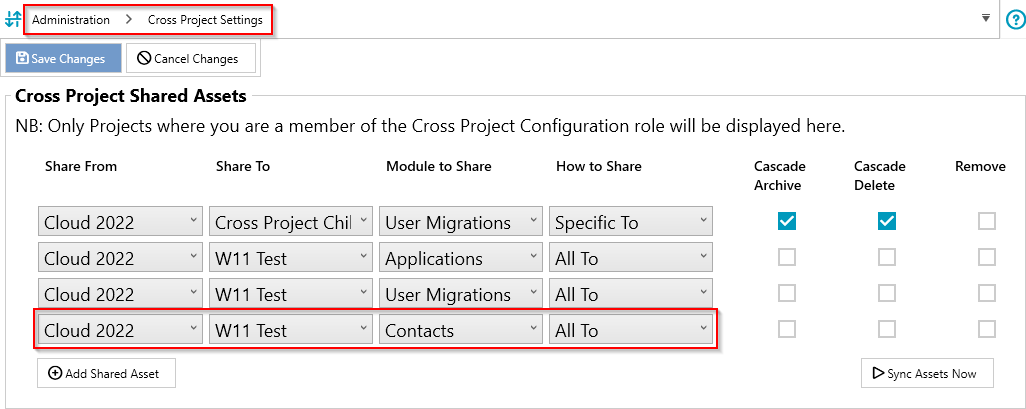
Syncing contacts does not require the REST API Importer. Contacts can be shared directly as shown in the user interface.
Example: Sync App Dependencies from Primary Project to Sub-Project
Headers
| Header | Value | Note |
|---|---|---|
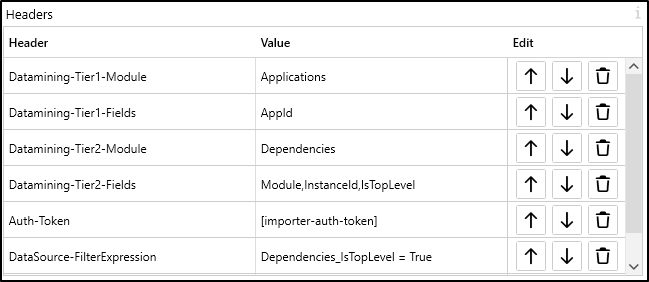
Auth-Token | [importer-auth-token] | Auto-generated token to connect to ManagementStudio |
Datamining-Tier1-Module | Applications | Retrieves the list of applications |
Datamining-Tier1-Fields | AppId | Adds the AppId field |
Datamining-Tier2-Module | Dependencies | Adds a dependencies tier |
Datamining-Tier2-Fields | Module,InstanceId,IsTopLevel | Adds these fields |
DataSource-All | True | Includes all applications |
DataSource-FilterExpression | Dependencies_IsTopLevel = True | Filters for applications with top-level dependencies |
Field Mapping
| MCH | Src. Field | MS Field | Notes |
|---|---|---|---|
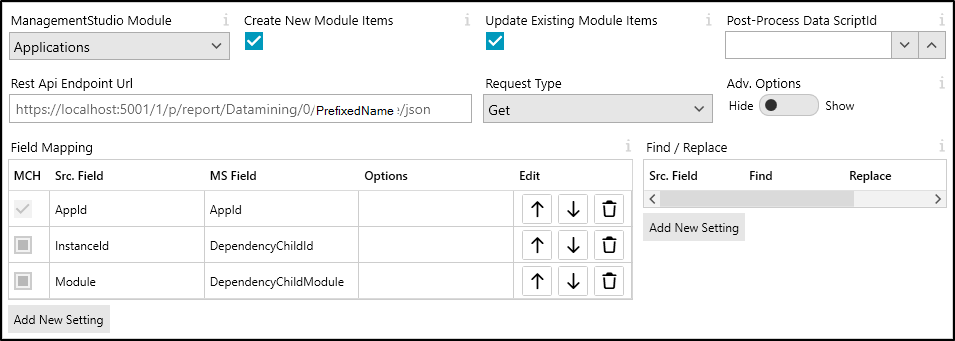
| Yes | AppId | AppId | Uses the AppId from the Primary Project for matching in the Sub-Project |
| InstanceId | DependencyChildId | Uses the InstanceId as DependencyChildId | |
| Module | DependencyChildModule | Indicates the module to which the dependency belongs |
Ensure you have:
- Enabled Endpoint for Datamining Reports
- Checked
Import Multiple Matched Rows
Further Support
For further assistance, visit the ManagementStudio Service Desk to search the knowledge base or raise a new support ticket.
Was this article helpful?
That’s Great!
Thank you for your feedback
Sorry! We couldn't be helpful
Thank you for your feedback
Feedback sent
We appreciate your effort and will try to fix the article