TABLE OF CONTENTS
Overview
The All, Ready, Remaining chart offers a high‑level view of a module's readiness by summarising items according to their Process Status. For example, a chart with applications set as the source can show how many applications there are in total, how many are Ready and how many are Remaining. You can further narrow the chart’s source data by selecting a specific Blueprint or Deployment Unit in the chart's Data Source.
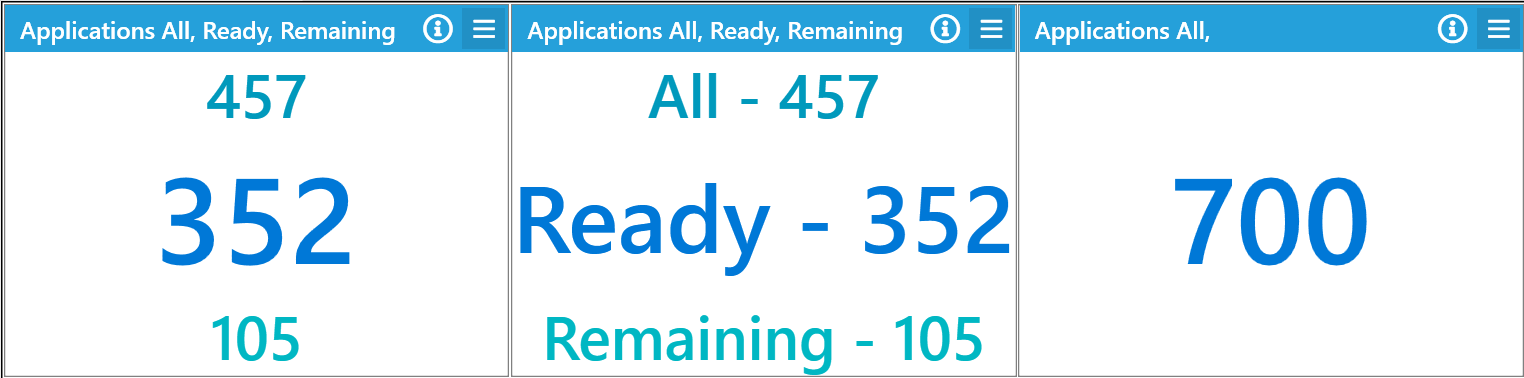
Widget Variants
The widget offers several display options:
Simple Totals
Displays only the total count from the chart's data source.All, Ready, Remaining
Displays the counts forAll,Ready, andRemainingitems, in order.All, Ready, Remaining (With Labels)
Displays theAll,Ready, andRemainingcounts in order, each prefixed by its respective label.
Advanced Arguments
There are no advanced arguments available for this widget.
Supported Modules
The All, Ready, Remaining widget can be used with the following modules:
- Applications
- User Migrations
- Devices
- Mailboxes
- Bespoke Module
- Deployment Units
- Defects
- Tasks
Supported Chart Types
- Text Chart
Further Support
For further assistance, visit the ManagementStudio Service Desk to search the knowledge base or to create a support ticket.
Was this article helpful?
That’s Great!
Thank you for your feedback
Sorry! We couldn't be helpful
Thank you for your feedback
Feedback sent
We appreciate your effort and will try to fix the article