TABLE OF CONTENTS
Overview
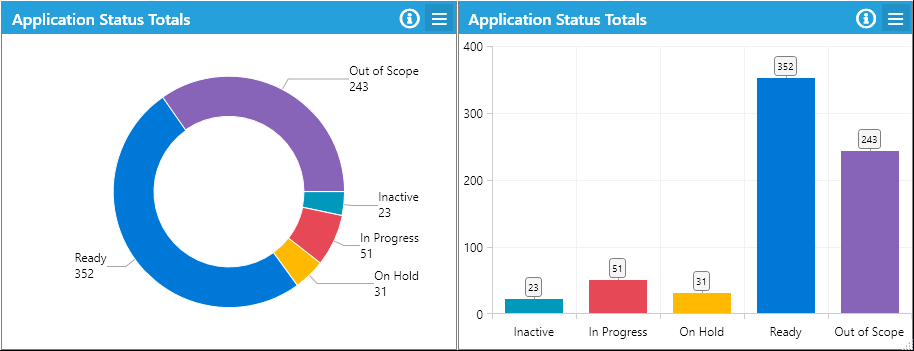
The Status Totals widget displays a real-time count of records (such as Apps, Users, Devices) grouped by their current Process Status. Unlike the Process Totals widget, which groups by Process, this widget focuses on the Process Status (sometimes referred to as "readiness"), providing a concise view of project progress. Process Statuses are assigned to each process and can be one of the following:
- Not Started
- In Progress
- On Hold
- Ready
- Out of Scope
This approach enables large process trees to be summarised effectively in visual charts.
Variants
Status Only
- Displays the total count for each of the five statuses.
- Recommended chart types: Pie, Bar.
Process vs Status
- Adds Processes as an axis in the chart.
- Shows the count of each Status within each Process.
- Recommended chart type: Bar (Stacked).
Status vs Process
- Adds Statuses as an axis in the chart.
- Shows the count of Processes within each Status.
- Recommended chart type: Bar (Stacked).
Supported Modules
This widget supports the following modules:
- Applications
- User Migrations
- Devices
- Mailboxes
- Bespoke Module
- Deployment Units
- Defects
- Tasks
Supported Chart Types
The following chart types are supported:
- Clustered Bar (horizontal and vertical)
- Stacked Bar (horizontal and vertical)
- Pie
- Doughnut
Further Support
For additional assistance, visit the ManagementStudio Service Desk to search the knowledge base or create a support ticket.
Was this article helpful?
That’s Great!
Thank you for your feedback
Sorry! We couldn't be helpful
Thank you for your feedback
Feedback sent
We appreciate your effort and will try to fix the article