TABLE OF CONTENTS
Description
The Survey Status chart provides multiple visualisations of survey data, allowing you to monitor pass and fail rates over time, group results by survey, and view overall trends. Selecting the appropriate chart type for your chosen variant is essential. Example screenshots and recommended chart types are listed below.
Variants
The recommended chart type is shown in brackets within the variant name.
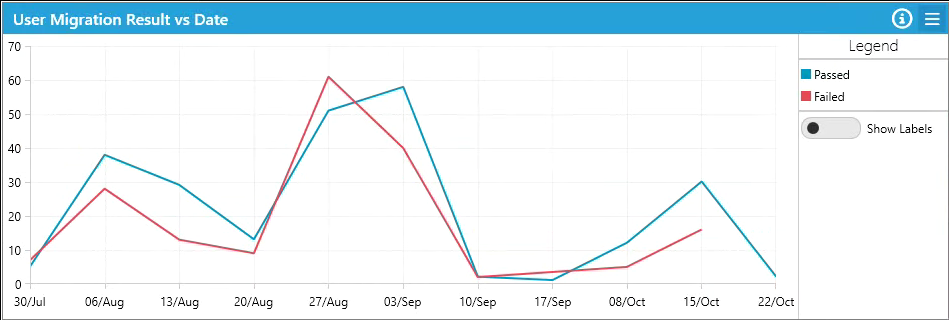
Result vs Date
- Displays pass/fail results plotted over time.
- Recommended chart type: Line Chart
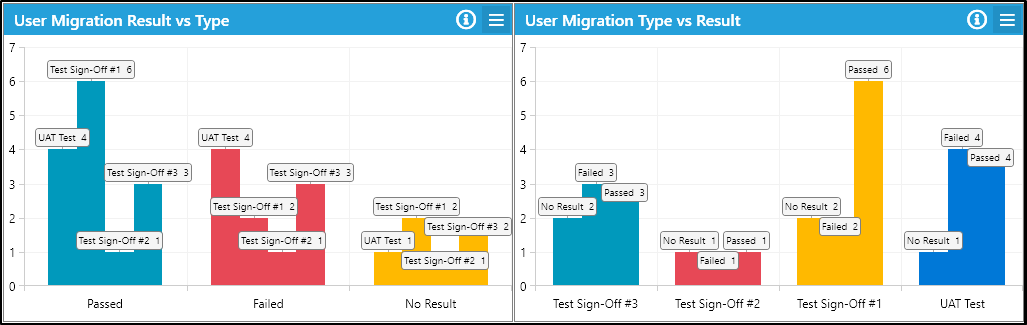
Result vs Type
- Displays pass/fail/outstanding counts with survey type as the axis.
- Summarises survey type results.
- Recommended chart type: Bar Chart
Type vs Result
- Uses test names as the chart axis.
- Summarises counts of pass/fail per test name.
- Recommended chart type: Bar Chart
Result Totals
- Shows aggregate pass, fail, and outstanding values without distinguishing survey types.
- Provides an overall summary.
- Recommended chart type: Pie Chart
Advanced Widget Arguments
Filter results to specific Survey Name
- Restricts results to a specific survey.
- Accepts either
SurveyIdor survey name. - Example: To view only the 'App Owner Survey', enter 'App Owner Survey'.
Look back Weeks
- Filters results by the number of weeks to look back.
- Uses the survey submission date for filtering.
- Can be used with any variant, but is most effective with 'Result vs Date'.
Supported Modules
- Applications
- User Migrations
- Devices
- Mailboxes
- Bespoke
Supported Chart Types
- Line Charts
- Bar Charts
- Pie Charts
Further Support
If you require additional assistance, visit the ManagementStudio Service Desk to search the knowledge base or raise a new support ticket.
Was this article helpful?
That’s Great!
Thank you for your feedback
Sorry! We couldn't be helpful
Thank you for your feedback
Feedback sent
We appreciate your effort and will try to fix the article