TABLE OF CONTENTS
Overview
The Datamining Admin area allows administrators to manage all Datamining Reports (DMRs) created by ManagementStudio users. It provides visibility of report ownership, usage statistics, and administrative controls to help maintain the reporting environment.
As a Datamining Administrator, you can:
- View all DMRs across the project.
- Review report ownership and configuration.
- Monitor usage and adoption statistics.
- Identify unused or duplicate reports.
- Manage report accessibility and visibility where appropriate.
Accessing the Datamining Admin
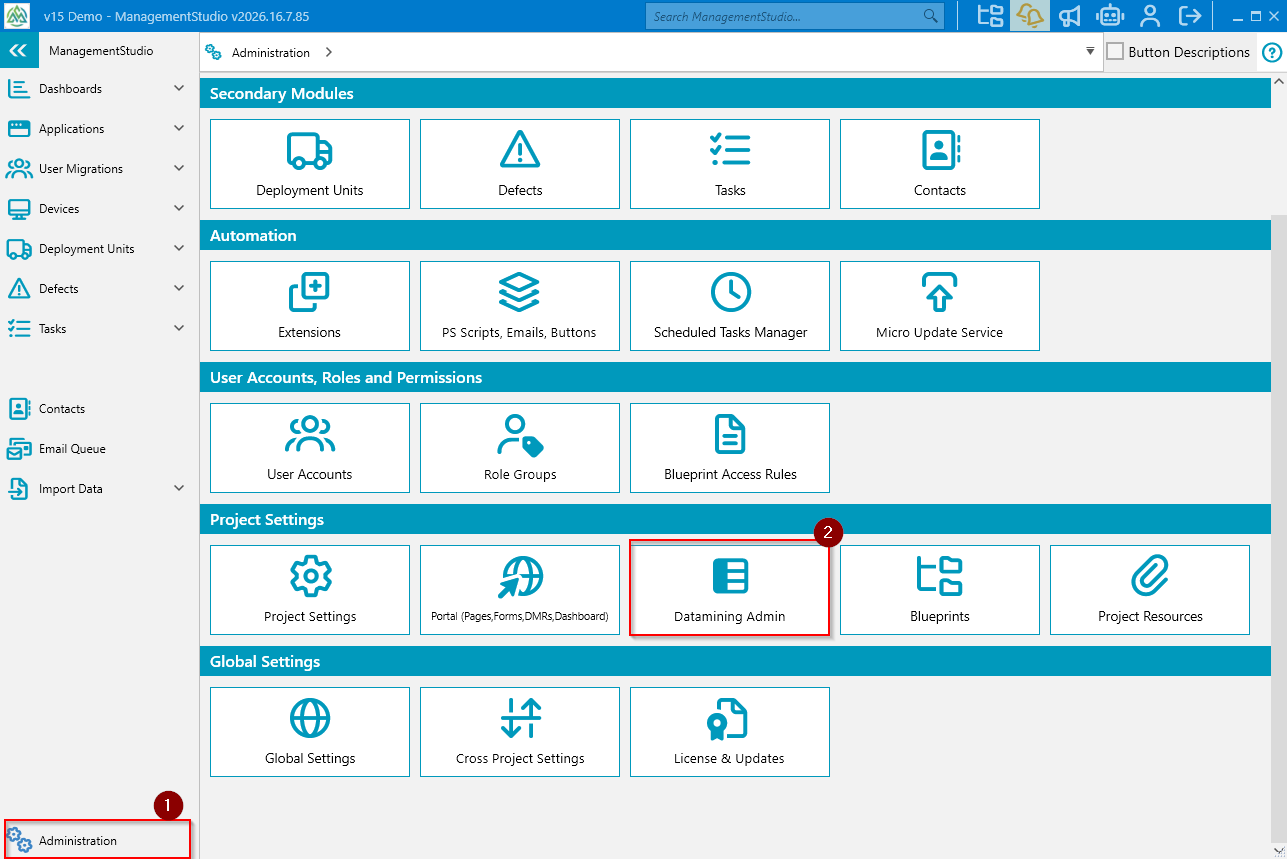
- Click the
Administration(1) icon in the lower left of the ManagementStudio screen. - On the Administration page, click the
Datamining Admin(2) icon in theProject Settingssection. - The system will display all DMRs available within the project.
Access to Datamining Admin is typically restricted to users with administrative permissions. The user will need to be granted the 'Manage Datamining reports' permissions.
Datamining Admin Layout
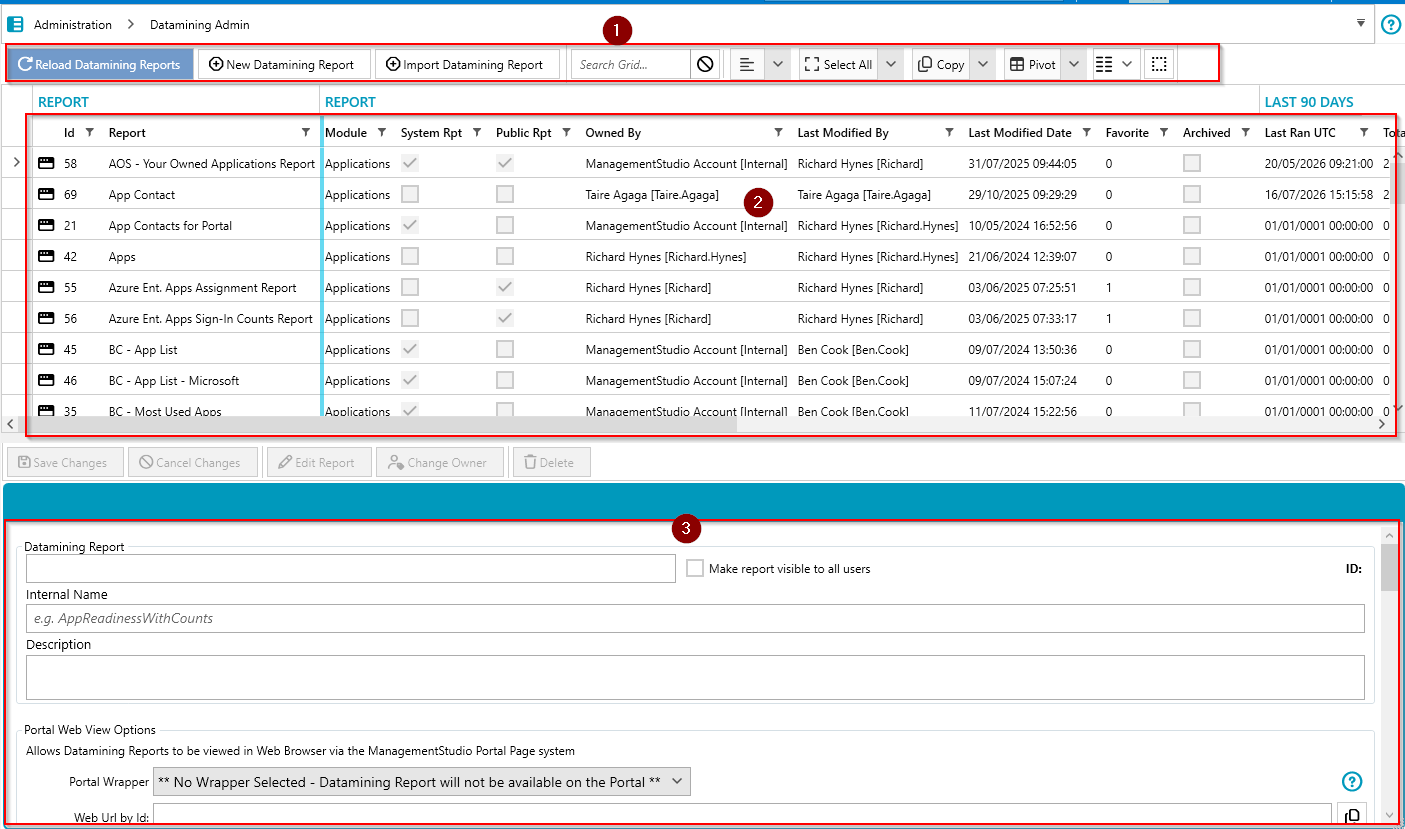
The Datamining Admin interface consists of:
- Control Bar (1)
- Datamining Report Grid (2)
- Details View (3)
Control Bar
- Reload Datamining Report - Refreshes the Datamining Report grid
- New Datamining Report - Creates a new Datamining Report
- Import Datamining Report - Import a Datamining Report
- Search Grid
- Clear Search
- Toggle Group Bar - Show/Hide Grid group bar (allows grouping the grid by a heading)
- Expand All Groups
- Collapse All Groups
- Toggle Group Footers
- Select All (Highlights all entries)
- Select None (deselect all entries)
- Invert (invert current selections)
- Copy (Copy selected to clipboard)
- Export to Excel (All)
- Export to CSV (All)
- Pivot to table
- Pivot to chart
- Grid Column Chooser
- Reset Grid Layout
Datamining Report Grid
| UI Element | Description |
Datamining report Id | The ID of the Datamining Report. |
| Report Name | Name of the Datamining Report. |
| Module | The module where the report was created such as Apps, Users etc. |
| System Report | Denotes if its a system datamining report. |
| Public Report | Denotes if its a Public datamining report. |
| Owned By | Displays the owner of the report. |
| Last Modified By | The individual who last updated the report. |
| Last Modified Date | Displays the date the report was last updated. |
| Favorite | Displays the number of users who have this report set as their favorite. |
| Archived | Displays whether a report is Archived. |
| Last Ran UTC | Displays when the report was last ran. |
| Total Runs | Displays the total number of times the report has been ran. |
| Avg Per Day | The average times per day it has been ran. |
| Avg Time | The average complete time the report runs. |
| Success | The number of times it has been ran successfully. |
| Fail | The number of times it has failed when ran. |
| Portal Icon | |
| Portal Wrapper | Set the Portal wrapper for a report. |
| Private Json Endpoint | Enable or Disable Authorised Json Endpoint for a report. |
Public Json Endpoint | Enable or Disable Public Json Endpoint for a report. |
Private Web Endpoint | Enable or Disable Authorised Web Endpoint for a report. |
| Public Web Endpoint | Enable or Disable Public Web Endpoint for a report. |
| Fast Cache Enabled | Enable or Disable Datamining Fast Cache for a report |
Details View
For more information on the details view, please refer to this article.
Context Menu
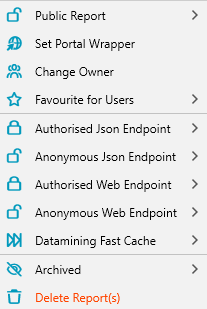
The datamining report grid provides a context menu that allows bulk actions to be performed on selected rows.
The actions available include the following:
- Setting report(s) as a Public Report
- Setting a Portal Wrapper for Multiple Reports
- Changing the Owner for Report(s)
- Favouriting Reports for Users
- Setting Up an Authorised/Public JSON Endpoint
- Setting Up an Authorised Web/Public JSON Endpoint
- Setting Up Datamining Fast Cache
- Archiving or Deleting Reports
Further Support
For additional assistance, visit the ManagementStudio Service Desk to search the knowledge base or submit a support ticket.
Was this article helpful?
That’s Great!
Thank you for your feedback
Sorry! We couldn't be helpful
Thank you for your feedback
Feedback sent
We appreciate your effort and will try to fix the article