TABLE OF CONTENTS
Test Sign-Offs
Test Sign-Offs in ManagementStudio allow project administrators to define and manage testing protocols across multiple modules. Common use cases include User Acceptance Testing (UAT), Quality Assurance (QA), and Compatibility Testing. Test Sign-Offs enable the design of scenario-specific questions, notification of testers, collection of responses, and reporting on test outcomes.
This guide uses the Applications module as an example; the same process applies to User Migrations, Devices, Deployment Units, Bespoke, and Defects modules.
Accessing Test Sign-Offs
To access and configure Test Sign-Offs:
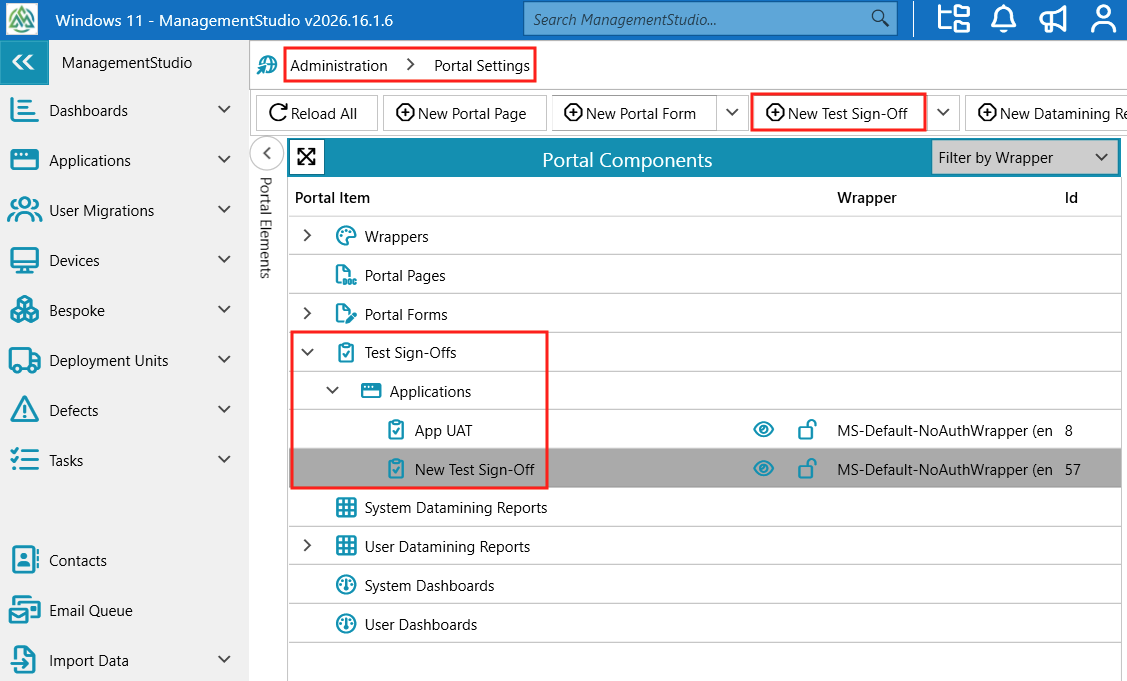
- Navigate to
Administration→Portal Settings→Test Sign-Offs. - In the Portal Elements tree view, select an existing Test Sign-Off or click
Create a New Test Sign-Offin the toolbar and select the relevant module.
Test Sign-Off Screen Structure
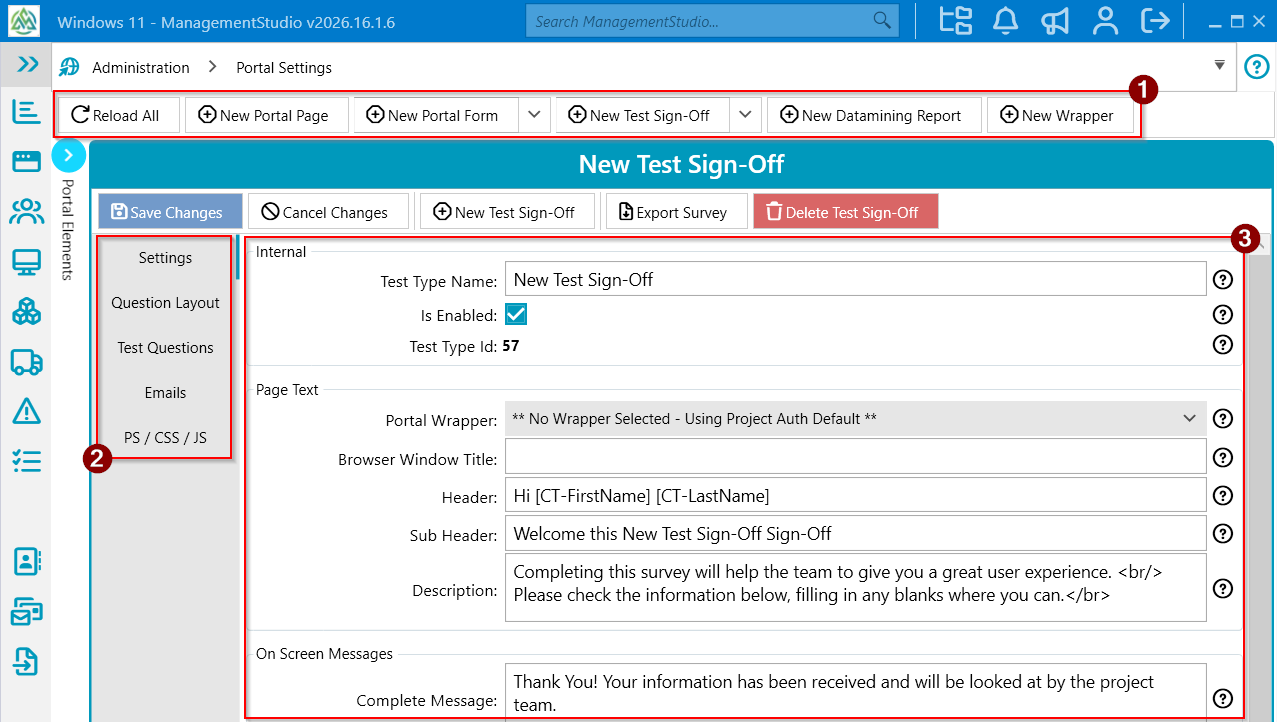
The Test Sign-Off interface is divided into three main areas:
- Button Toolbar (#1)
- Options Menu (#2)
- Configuration Area (#3)
Button Toolbar
- Save Changes
- Cancel Changes
- New Test Sign-Off
- Export Survey
- Delete Test Sign-Off
Options Menu
Settings
Configure Test Sign-Off options such as:
- Portal Wrapper
- Browser window title
- Headers
- On screen settings
- Email reminder threshold
- RDP template
- Calendar settings
Question Layout
- Control the visual layout and behaviour of Test Sign-Offs, and map question responses to fields in ManagementStudio.
- Add controls such as:
- Text and layout elements (header, text, line, spacer)
- Show/hide sections
- Session tokens
- Datamining Report
- Cascading Dropdown
- Pick Deployment Unit
- Pick/Move Blueprint
- View Blueprints List
- View Notes List
- Add Attachment
- Script Button
- View PDF
- View/Add links for Application, User Migration, Device, Mailbox, Bespoke, Defect, and Task entities
- Define layout, field text, tooltips, and set fields as mandatory as required.
Test Questions
Create individual test questions, specifying the input type (e.g., radio button, selection list) and additional options. These questions are referenced in the Question Layout tab.
Emails
Define templates for emails sent to testers, including:
- Request Email (test link, RDP file, calendar invitation)
- Reminder Email
- Completion Email (thank you message)
- Updated Test Email
- Cancelled Test Email
PS / CSS / JS
Apply custom PowerShell scripts, cascading style sheets, and JavaScript to control test survey appearance and behaviour.
Configuration Area
The configuration area content changes according to the selected Options Menu tab and is used to input the corresponding settings, text, or questions.
Additional Reading
- Test Sign-Offs Settings
- Test Settings: Question Layout
- Test Settings: Test Questions
- Test Sign-Off Emails
- Test Settings: PS / CSS / JS
Further Support
For additional assistance, visit the ManagementStudio Service Desk to search the knowledge base or submit a support request.
Was this article helpful?
That’s Great!
Thank you for your feedback
Sorry! We couldn't be helpful
Thank you for your feedback
Feedback sent
We appreciate your effort and will try to fix the article